Encryption & Security
How we protect your thoughts with end-to-end encryption
Critical Warning: Do Not Lose Your Passphrase
If you lose access to your app as the circle owner with encryption enabled, the passphrase CANNOT be recovered.
All encrypted data in the circle will be permanently inaccessible. We cannot help you recover encrypted data without the passphrase.
We strongly recommend storing your passphrase in a secure password manager.
How Encryption Works
When you enable encryption for a circle, Sharing Me uses end-to-end encryption (E2EE) to protect your journal entries. This means:
- Your entries are encrypted on your device before being sent to our servers
- Only people with the passphrase can decrypt and read the entries
- Our servers store only encrypted data - we cannot read your content
- Even if our servers were compromised, your data would remain unreadable
Enabling Encryption
To enable encryption for a circle:
- Open Circle Settings: Tap the circle name or go to "My Circles" and tap the edit icon on the circle you want to encrypt.
- Enable Encryption: Toggle the "Encryption enabled" switch to ON.
- Save the Passphrase: A unique passphrase will be generated. Store this passphrase securely!
Screenshot: Encryption Settings
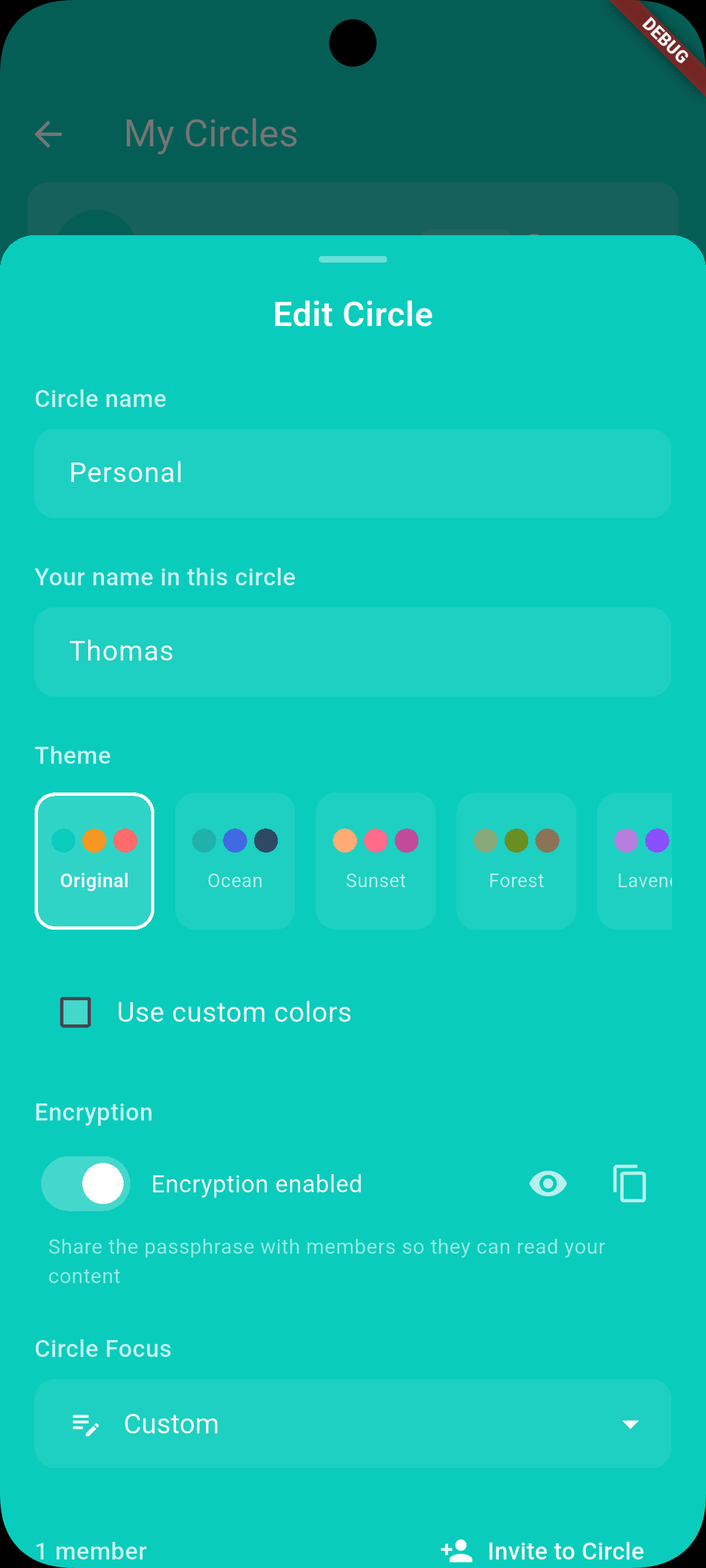
The encryption toggle with icons to view (eye) and copy (clipboard) your passphrase
Viewing & Copying Your Passphrase
If you need to view or share your existing passphrase:
- Go to your circle's settings (tap the circle name or edit icon)
- Look for the "Encryption enabled" toggle
- To view: Tap the eye icon to reveal the passphrase
- To copy: Tap the copy icon to copy the passphrase to your clipboard
Sharing with Circle Members
When you invite someone to an encrypted circle, they will need the passphrase to read entries. You should:
- Share the passphrase through a secure channel (in person, encrypted messaging, etc.)
- Avoid sending the passphrase via unencrypted email or SMS
- Consider using a password manager that supports secure sharing
Each circle member enters the passphrase once in their app. It's stored securely on their device for future use.
What Happens If You Lose the Passphrase
Important: No Recovery Option
Because we use true end-to-end encryption, we do not have access to your passphrase and cannot reset it. If you lose the passphrase:
- You will not be able to read existing encrypted entries
- Other circle members with the passphrase can still access the data
- You can disable encryption, but existing encrypted entries will remain unreadable
- New entries (after disabling) will not be encrypted
Best Practices
Use a Password Manager
Store your passphrase in a reputable password manager like 1Password, Bitwarden, or Apple Keychain.
Keep a Backup
Write down the passphrase and store it in a safe place (safety deposit box, fireproof safe, etc.).
Share Securely
When inviting members, share the passphrase in person or via an encrypted messaging app.
Technical Details
For those interested in the technical implementation:
- Algorithm: AES-256-GCM encryption
- Key derivation: PBKDF2 with unique salt per circle
- Passphrase: Cryptographically random, generated client-side
- Storage: Passphrase stored in device secure storage (Keychain/Keystore)
Questions?
If you have questions about encryption or security, please contact us at hi@sharingme.app.